

Contents
- Chapter 1: Designing test questions: an art in itself
- Chapter 2: An overview of the most important question types
- Chapter 3: Advantages of a digital e-assessment platform
1. Designing test questions: an art in itself
To create an exam, you need some questions. That sounds obvious enough, but designing test questions is an art in itself. To begin with, the content of your questions needs to be perfectly tailored to:
- the participants’ level, and
- the knowledge and/or skills you want to test.
And then the format of your questions plays a crucial role.
That is why we offer you a wide range of question types to choose from. You can use a single question type throughout your test, for example a written exam with ten open questions. However, most tests include a combination of question types. For instance, you can
- alternate between open and closed questions,
- link a written evaluation to an oral component, or
- combine different interactions: filling in, identifying, matching, sorting, etc.
The better the content of your questions corresponds to the learning goal, the easier it becomes to choose a suitable question type. So always be clear in advance about exactly what you want to achieve. Do you want to test theoretical knowledge or practical skills? Do you want to check active or passive knowledge?
Last but not least, practical or organisational considerations may play a role in the choice of certain question type.

For example, with large groups it is an obvious choice to use mainly closed questions, simply because they are quicker and easier to correct (it can be done automatically). It is important to take these considerations as a guideline rather than the deciding factor in the choice to use or not use a certain type of question. After all, if you want to test the speaking skills of a large group of participants, there is no point in organising a written multiple-choice test.
2. An overview of the most important question types
There are many different types of questions to choose from in assessmentQ. We will list them for you here. We will also take a closer look at the ten most common types of questions, which we can split into five categories.
- Multiple-choice questions (3)
- Open questions (1)
- Questions in a text (3)
- Questions based on an image or background (1)
- Matching and sorting questions (2)
2.1. Multiple-choice questions
Multiple-choice questions are suitable for testing factual knowledge and comprehension. We will discuss three type.:
Multiple-choice
A classic multiple-choice question consists of two or more possible answers, of which only one is correct. Yes/no questions and true/false questions also belong to this category.

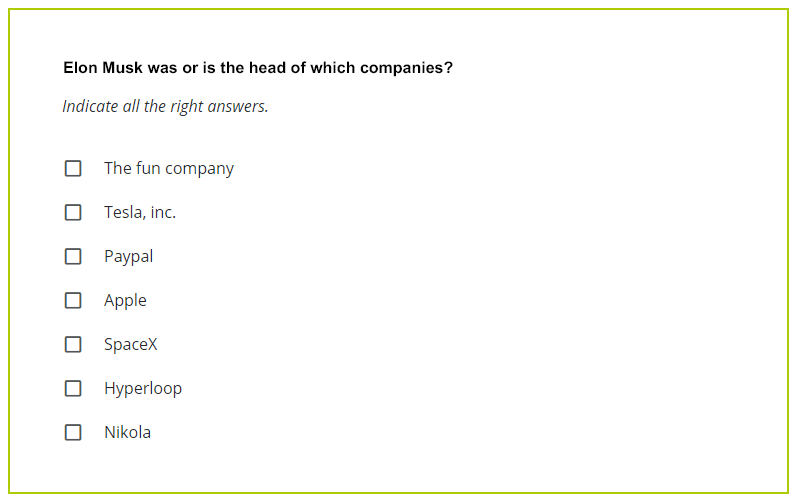
Multiple response
With this variant of the traditional multiple-choice question, the participant can indicate more than one correct answer. Be sure to point this out clearly in the wording of the question.
Multiple choice matrix
This type groups together several multiple-choice questions with the same possible answers. Each row or column represents a multiple-choice question with one correct answer.

2.2. Open questions
These type of questions are suitable for:
- getting your participants to think critically,
- testing their writing and speaking skills,
- testing insight into specific subjects.
Open question
In a traditional, written open question, the participant fills in a box with a text of their own. This type is ideal for testing writing skills.

2.3. Questions in a text
These question types are based on a text that may be incomplete or incorrect.
Fill gaps in text
For this question type, you omit one or more words or groups of words from a text. The participant fills in the missing info in the empty text boxes.

Dropdown in text
This is a variant on ‘fill gaps in text’, where the participant selects the correct answer from a menu. Each menu is essentially a multiple-choice question. You can also add misleading options to make the question more difficult.

Drag and drop in text
This is another variant on ‘fill gaps in text’ where the participant drags different text blocks to the right place in a text. Do you want to make the question more difficult? Add misleading options, i.e. answers that do not fit in anywhere.

2.4. Questions based on an image or background
These question types are based on a previously unseen image.
Click on image
In this question type, the participant indicates the answer on a previously unseen image. They may be expected to click on a point (specific) or a zone (more general) on the image.

2.5. Matching and sorting questions
This type of question involves several items that the participant has to link together or put in the right order. We will look at two types of matching and sorting questions.
Drag and drop in columns
In this question type, the participant drags items into the correct column. There are at least two columns, each of which contains at least one item. To make the question more difficult, add misleading options that do not belong anywhere.

Matching
Here, the candidate has to match up items from different columns. One of the columns is always fixed, and there is only one solution. Opt for this type of question if the order in which the items are presented does not matter.

2.6. Other question types
We have discussed the ten most common item types in detail above, but of course assessmentQ also contains other options. You will find a list of all the other possible question types below:
Case
A case is a group of several questions of the same or different types. It consists of an information screen followed by the questions, so the candidate can switch easily between questions and return to the information screen.
Image matrix
The image matrix consists of one or more multiple-choice questions ordered in rows. The specific feature of this is that the answer options are images.
Order vertically
In this question type, the participant sorts at least two items (steps or events) into the correct order. There is only one solution. This question type is ideal for testing understanding of a procedure.
Revise text
This question type is based on a text in one language or a translation that contains mistakes. The candidate needs to identify, correct and possibly classify the mistakes.
Recording
This question type can be used to:
- evaluate pronunciation, speaking skills or presentation skills
- record oral exams
Interpreting
This item type is intended specifically for interpreting exams. You can give the candidate either a consecutive or a simultaneous interpreting exercise.
Accounting
There are several question types to test accountancy knowledge and skills. You can ask the candidate to
- enter transactions in journals,
- draw up a balance sheet,
- fill in a profit and loss account,
- draw up a profit and loss statement.
Canvas
This is a less familiar type of open question, where the participant formulates their answer graphically by writing, drawing, colouring in, etc. with a stylus on a canvas.
Upload file
This question type makes it possible for a candidate to upload a certain file that they have created (e.g. a spreadsheet, audio or video file,…). The grader can then download this file and award points in the evaluation module.
Conjugate verbs (beta)
“Conjugate verbs” is an AI-supported question type that automatically detects verbs in an English or French text. The verbs are replaced by blank spaces, where the participant has to fill in the correctly conjugated form of the verb.
Math entry
A question type that can be used for all kinds of mathematical formulae and expressions. The examiner can evaluate the entire exercise or just the final answer.
Crossword puzzle
Enter a list of words and their definitions, and assessmentQ automatically turns them into a crossword puzzle. This is a creative and playful way of testing your candidates’ vocabulary or knowledge.
Drag and drop image on background
In this question type, candidates have to drag an image onto the correct drop zone on a different image.
Drag and drop text on background
A variant of ‘drag and drop image on background’. In this question type, the candidates are expected to be able to drag a piece of text onto the correct drop zone on the background image.
Fill gaps on background
This question type requires that the candidate fills in an answer in the correct place on a background image.
Dropdown on background
A variant of the previous question type. Likewise here, candidates need to fill in an answer in a box superimposed on an image, but they can choose from a predetermined list of choices.
Select text
In this question type, candidates need to select the correct words from a text using a virtual marker pen. This enables you to test grammatical knowledge digitally, for example.
Translate sentence
‘Translate sentence’ is ideal for short translation exercises. The candidates then get automatic feedback on missing, incorrect and/or superfluous words in their translation.
Oral open questions
This is essentially the same as the written open question, but the response is oral. This type is ideal for testing speaking skills.
3. Advantages of a digital e-assessment platform
More and more organisations and educational bodies are switching to digital tests. That makes sense, because you can work with any type of question in a digital environment. Some e-assessment platforms even suggest the most suitable type of question or offer extra support with setting and evaluating your questions.
We will run through the most significant advantages of a digital testing platform below.
3.1. Flexible structure
In a digital environment, you can easily position and reposition text and media blocks. For example, you can place the answers to a multiple-choice question next to or underneath each other.
3.2. Media files
It is easy to add media files such as images, audio and video on an e-assessment platform. With some question types such as multiple-choice questions, ‘drag and drop in columns’ or ‘order vertically’, the alternative answers can also be media files.
A good balance between text and media ensures a more pleasant experience and helps participants retain the tested material better. Additionally, you can program audio and video clips to start automatically and determine how many times the participant is allowed to play the clip.
3.3. External content
Besides media files, you can also easily upload external content:
- as an attachment: PDFs, PowerPoints, etc.
- embedded in the platform: GeoGebra, Google Forms, Vimeo, etc.
For example, do you use a minimum chart of accounts (PCMN/MAR) in your accountancy lessons? No problem: upload it to the digital e-assessment platform as an attachment.

3.4. Restrictions on questions
In a digital environment, you can add extra restrictions:
- determine how much time the participant may spend on each question,
- limit the number of characters or words allowed in an open question,
- limit the number of times a participant can play a media file, answer a question orally, click on an image, etc.
- provide a limited number of symbols with a maths question,
- use input masks to define valid input.
3.5. Make recordings
You can record exercises to test speaking and presentation skills (with both video and audio). You can start recording automatically or manually.
3.6. Scoring and feedback mechanisms
You can evaluate a digital test quickly, easily and in different ways:
- per question (distinguishing between incorrect answers and unanswered questions),
- by interaction within a given question (filling in, dragging, menu, etc.)
- based on keywords in open questions,
- correcting for guesses in multiple-choice questions.
You also have various ways of giving feedback:
- general feedback
- positive and/or negative feedback
- answer-specific feedback
3.7. Determining the status of questions
Last but not least, it is easy to determine the status of a question in digital tests as well:
- draft
- to be revised
- revised
- approved (only approved items can be published)